ROS 2 (Robot Operating System): A Beginner's Guide to What It Is and How to Get Started
September 28, 2026
What Is ROS 2?
ROS stands for Robot Operating System, but the name is misleading. ROS is a software framework, or middleware, that sits on top of an operating system (usually Ubuntu Linux) and handles communication between the different programs that make up a robot.
A typical robot has:
- Cameras, LiDAR, IMU and GPS sensors
- Motors, encoders and robotic arms
- Microcontrollers
- AI models for perception
- Navigation and planning algorithms
Without a framework, every component has to know how every other component works. ROS 2 removes that problem by providing the communication layer between them.
A simple pipeline looks like this:
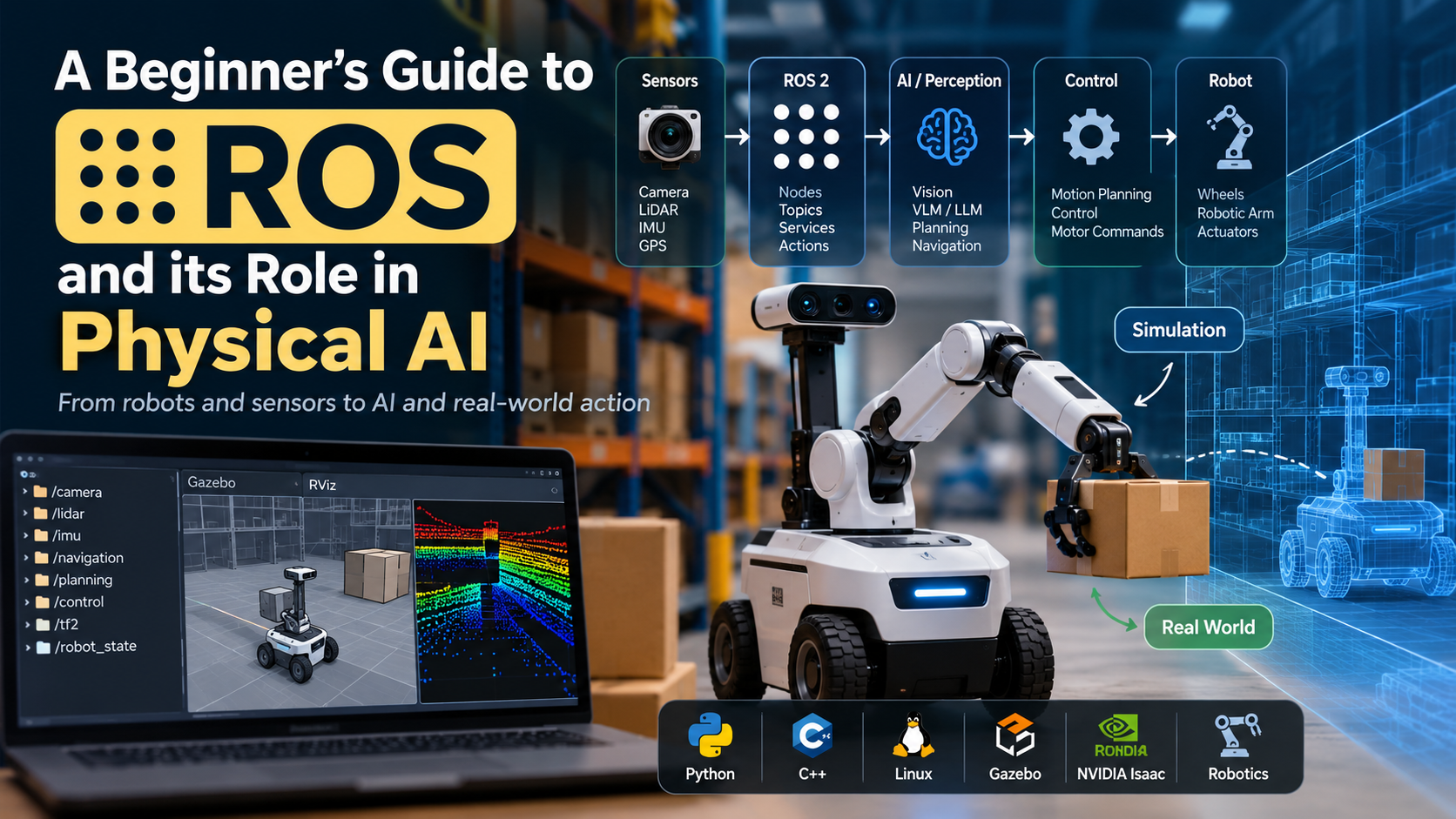
Camera → ROS camera node → Object detection AI → Planning node → Motor controller → Motor
An easy mental model: AI is the brain, ROS 2 is the nervous system, and the robot is the body.
Why ROS 2 Matters for Robotics and Physical AI
Ordinary AI is a straight line: input → model → output. For example, an image goes into YOLO and "person detected" comes out.
Physical AI is a continuous loop:
World → Sensors → Perception → Understanding → Planning → Decision → Control → Actuators → World
ROS 2 spans much of that loop. It's how a vision model or an LLM/VLM actually gets connected to wheels, arms and sensors. That's why ROS robotics is often the first practical skill people learn on the way to Physical AI, simulation-based training and humanoid robots.
The Core Concepts of ROS 2
There are five ideas to understand. If you're a software developer, each one maps to something you already know.
1. Nodes
A node is a small program that does one job, such as camera_node, lidar_node, object_detection_node or motor_controller_node. Because each node is independent, you can develop, test and replace them separately. This is the ROS version of microservices.
2. Topics (publish/subscribe)
Topics are named channels for continuous data streams. A camera node publishes images to /camera/image, and any number of nodes (object detection, visual SLAM) can subscribe to it. If you know Kafka topics or Redis Pub/Sub, this will feel familiar. Typical topics are /camera/image, /lidar/scan, /imu/data and /robot/joint_states.
3. Services (request/response)
Services are for one-off requests that need a reply, like an API call. "Open the gripper" sends a request and returns success: true.
4. Actions (long-running tasks)
Actions handle tasks that take time and need progress updates. Tell a robot "go to the kitchen" and it may take 30 seconds. An action gives you a goal, continuous feedback while it runs, and a final result. Think of it as an asynchronous job system.
5. Messages
Messages are the standard data formats nodes exchange. For example, geometry_msgs/Twist describes velocity with linear and angular x/y/z values. A navigation node can publish linear.x = 0.5 and angular.z = 0.2, and any motor controller that understands Twist will respond.
ROS 2 concepts for backend developers
| Web / backendROS 2 | |
| Microservice | Node |
| Event stream | Topic |
| API call | Service |
| Async job | Action |
| JSON / schema | Message |
| Service discovery | ROS graph |
| Observability tooling | ROS tools (ros2 topic, rqt, RViz) |
ROS 2 vs ROS 1: Which Should You Learn?
Learn ROS 2. ROS 1 is legacy, and its final distribution, ROS Noetic, has reached end of life. Older ROS 1 releases such as Melodic are long unsupported.
ROS 2 was redesigned for:
- Distributed and multi-robot systems
- Real-time and embedded use
- Security
- Industrial and production deployments
Under the hood, ROS 2 uses DDS (Data Distribution Service) for communication, so nodes on different machines can discover and talk to each other over a network. If you have a distributed-systems background, this is the part you'll enjoy.
A Short History of ROS
ROS began at Willow Garage in the late 2000s and became the de facto standard for robotics research and development. Its maintenance later moved to Open Robotics, now Open Source Robotics Foundation (OSRF) and its community. ROS 2 was created to fix the limits of ROS 1, mainly around real-time behavior, multi-robot setups and production reliability.
ROS 2 Distributions: Humble, Jazzy, Lyrical and More
A ROS 2 distribution is a versioned release of ROS 2 packages, tied to a specific Ubuntu version. New ones come out every May. Long-term support (LTS) releases are the safe choice for learning and production.
| DistributionReleasedSupport endsNotes | |||
| Lyrical Luth | May 2026 | May 2031 | Newest LTS |
| Kilted Kaiju | May 2025 | December 2026 | Short-lived, non-LTS |
| Jazzy Jalisco | May 2024 | May 2029 | LTS, targets Ubuntu 24.04 |
| Humble Hawksbill | May 2022 | May 2027 | LTS, targets Ubuntu 22.04 |
Always verify dates on the official ROS 2 releases page, since they can change.
Which one should you pick?
- ROS 2 Humble has the most tutorials, courses and Stack Overflow answers, and is still widely used. Choose it if you're following a course or book written for it, or you're on Ubuntu 22.04.
- ROS 2 Jazzy is a strong choice on Ubuntu 24.04 and has a longer support window.
- Lyrical Luth is the newest LTS, with the longest support runway, but has the fewest third-party tutorials so far.
The core concepts are identical across all of them, so what you learn on one transfers to the others.
How to Install ROS 2 (Quick Overview)
The recommended setup is Ubuntu Linux with the matching ROS 2 distribution. Windows and macOS are possible, but Ubuntu is the smoothest for beginners. If you're on Windows, WSL2 or a dual-boot/VM Ubuntu install works well.
High-level ROS 2 install steps (Humble on Ubuntu 22.04 as the example):
- Set up your locale (UTF-8) and enable the Ubuntu Universe repository.
- Add the ROS 2 apt repository and its GPG key, following the official instructions.
- Update and install:
bash
sudo apt update
sudo apt upgrade
sudo apt install ros-humble-desktop
- Source the setup file so your terminal can find ROS:
bash
source /opt/ros/humble/setup.bash
Swap humble for jazzy or lyrical if you're on a different distro and matching Ubuntu version. For the exact repository setup commands, follow the official installation page in the ROS 2 documentation for your distro, because those steps change between releases.
Verify your install by running the classic talker/listener demo in two terminals:
bash
# Terminal 1
ros2 run demo_nodes_cpp talker

# Terminal 2
ros2 run demo_nodes_py listener
If the listener prints messages from the talker, ROS 2 is working.
Your First ROS 2 Experiments
Once installed, try these to see the concepts live:
bash
ros2 node list          # see running nodes
ros2 topic list         # see active topics
ros2 topic echo /chatter   # watch messages on a topic
ros2 service list       # see available services
Then install and drive the famous turtlesim simulator:
bash
sudo apt install ros-humble-turtlesim
ros2 run turtlesim turtlesim_node
ros2 run turtlesim turtle_teleop_key
Moving the turtle with your keyboard is your first real publish/subscribe interaction: the teleop node publishes velocity messages, and the simulator subscribes to them.
A ROS 2 Learning Path That Works
You don't need to learn all of robotics at once. This order works well for developers.
Phase 1: ROS 2 fundamentals. Nodes, topics, messages, services, actions, parameters, launch files, packages, the ROS graph, and TF2 (which tracks coordinate frames such as world → robot → camera → arm → gripper).
Phase 2: Robot fundamentals. Sensors, coordinate systems, kinematics, dynamics, localization, mapping, navigation, motion planning and control.
Phase 3: Simulation. Combine ROS 2 with Gazebo to build and test simulated robots with physics, sensors and collisions. You can learn robotics without buying a robot that costs lakhs of rupees.
Phase 4: AI integration. Add computer vision, YOLO, and VLM/LLM models to your ROS 2 system.
Phase 5: Physical AI. Combine ROS 2 with NVIDIA Isaac Sim, reinforcement learning, and eventually a real robot.
Underneath all of this you'll want solid Linux, Python and C++ basics. ROS 2 officially supports both Python (rclpy) and C++ (rclcpp).
A Beginner Project: Autonomous Warehouse Robot
Skip the humanoid for now. Build a simulated warehouse robot in stages:
- Level 1: The robot moves.
- Level 2: It avoids obstacles.
- Level 3: It maps its environment.
- Level 4: It navigates to a location.
- Level 5: It recognizes objects.
- Level 6: It understands natural-language commands like "Go to shelf 4 and pick up the red box."
- Level 7: You move from simulation to a real robot.
This one project touches nodes, topics, actions, navigation, perception and AI, so it teaches most of what ROS robotics involves.
Best Resources for Learning ROS 2
- Official documentation: The ROS 2 documentation for your distro (for example, the ROS 2 Humble documentation) is the authoritative reference, and its beginner tutorials are the best place to start. Use the docs rather than the old ROS wiki, which mostly covers ROS 1.
- Tutorials: Work through the official "Beginner: CLI tools" and "Beginner: Client libraries" tutorials first.
- Courses: If you prefer structured learning, look for a ROS 2 course that covers nodes, launch files, TF2, Nav2 and simulation, and matches your distro.
- Practice: Build something. Reading alone won't make ROS click.
Frequently Asked Questions About ROS 2
What is ROS 2 in simple terms?
ROS 2 is free, open-source middleware that lets the different software parts of a robot (sensors, AI, planning, motor control) communicate through a standard system of nodes, topics, services and actions.
Is ROS an operating system?
No. Despite the name, ROS runs on top of an operating system, usually Ubuntu Linux. It's a framework and set of tools and libraries for building robot software.
What is ROS used for?
ROS 2 is used to build robots of all kinds: mobile robots, robotic arms, drones, self-driving vehicles, warehouse automation and humanoids. It's used in research, education and industry.
Should I learn ROS 1 or ROS 2?
Learn ROS 2. ROS 1's last distribution, Noetic, is end of life, and ROS 2 is the actively developed version with better support for real-time, multi-robot and production use.
Which ROS 2 version should I use: Humble, Jazzy or Lyrical?
For maximum tutorial coverage, use Humble on Ubuntu 22.04. For a longer support window on a newer system, use Jazzy on Ubuntu 24.04, or Lyrical Luth, the newest LTS. Core concepts are the same across all of them.
What programming languages does ROS 2 use?
Python and C++ are the primary supported languages. Python is quicker for prototyping, and C++ is preferred for performance-critical nodes.
Do I need a physical robot to learn ROS 2?
No. You can learn with simulators like Gazebo or NVIDIA Isaac Sim, and the same ROS 2 code can often run on simulated or real hardware.
Is ROS 2 hard to learn?
It has a learning curve, mostly around Linux, build tools and the many concepts involved. If you already know software development, thinking of ROS 2 as a distributed-systems architecture makes it much easier.
How does ROS 2 relate to Physical AI?
Physical AI needs AI models to perceive and act in the real world. ROS 2 is the communication layer that connects those models to sensors, planners, controllers and actuators.
Key Takeaways
- ROS 2 is middleware, not an operating system. It connects a robot's software components.
- The five core concepts are nodes, topics, services, actions and messages.
- Learn ROS 2, not ROS 1. Noetic is end of life.
- Pick an LTS distribution: Humble, Jazzy or Lyrical Luth.
- Start on Ubuntu, verify with the talker/listener demo, then play with turtlesim.
- Use simulation (Gazebo, Isaac Sim) to learn without hardware.
- Build a project like the warehouse robot to make the concepts stick.